
Hey there! As a supplier of Handheld HMIs, I've seen my fair share of these nifty devices. And one question that comes up a lot is how to clean them properly. A clean Handheld HMI not only looks good but also performs better and lasts longer. So, let's dive into the nitty - gritty of cleaning these devices.
Why Cleaning Your Handheld HMI Matters
First off, you might be wondering why you even need to clean your Handheld HMI. Well, think about it. You use these things all the time. Your hands touch the screen, and over time, dirt, oil, and grime build up. This can not only make the screen look dull but also affect its touch sensitivity. Plus, if you're using it in an industrial environment, there could be dust and debris that can clog the ports or even damage the internal components.
What You'll Need
Before you start cleaning, gather the right tools. You don't need a bunch of fancy stuff. Here's what I recommend:
- Microfiber Cloth: This is a must - have. Microfiber cloths are soft and won't scratch the screen. They're great at picking up dust and smudges.
- Isopropyl Alcohol: A 70% isopropyl alcohol solution works well. It can kill germs and dissolve stubborn dirt and oil. But don't use it directly on the screen.
- Distilled Water: It's better than tap water because it doesn't contain minerals that can leave streaks on the screen.
- Cotton Swabs: These are handy for getting into small crevices and cleaning around the ports.
Step - by - Step Cleaning Process
Power Off the Device
This is a no - brainer. Before you start cleaning, turn off your Handheld HMI. You don't want any electrical issues or accidental button presses while you're cleaning.
Dry Dusting
Take your microfiber cloth and gently wipe the entire surface of the Handheld HMI. Start from the top and work your way down. This will remove loose dust and debris. Pay special attention to the edges and corners where dust tends to accumulate.
Cleaning the Screen
If the screen has just a few smudges, you can try using a dry microfiber cloth first. But if there are stubborn fingerprints or dirt, dampen the cloth with a mixture of distilled water and a small amount of isopropyl alcohol. Make sure the cloth is only slightly damp, not dripping wet.
Gently wipe the screen in a circular motion. Don't press too hard, or you might damage the touch - sensitive layer. If there are some really tough spots, you can let the damp cloth sit on the spot for a few seconds before wiping again.
Cleaning the Body
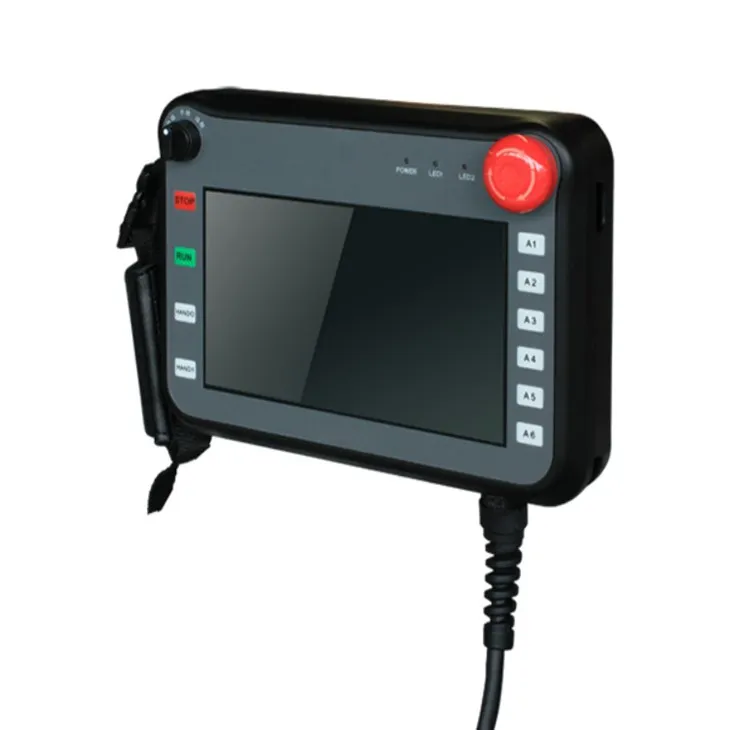
The body of the Handheld HMI can also get dirty. Use the same slightly damp microfiber cloth to wipe the sides, back, and front of the device. If there are any ports or buttons, be extra careful. You can use a cotton swab dipped in the alcohol - water mixture to clean around these areas. Just make sure not to get any liquid inside the ports.
Drying
After you've finished cleaning, use a dry microfiber cloth to dry the device completely. Make sure there's no moisture left, especially around the ports. Let the device air - dry for a few minutes before turning it back on.
Special Considerations
- Avoid Abrasive Materials: Never use paper towels, tissues, or anything with a rough texture. They can scratch the screen and damage the device.
- Don't Spray Liquid Directly: Spraying liquid directly on the screen or the device can cause liquid to seep inside and damage the internal components. Always dampen the cloth first.
- Follow Manufacturer's Instructions: Some Handheld HMIs might have specific cleaning instructions from the manufacturer. Make sure to check those before you start cleaning.
Our Handheld HMIs
At our company, we're proud to offer high - quality Handheld HMI. Our devices are built to last and are designed with user - friendliness in mind. Whether you're using them in a manufacturing plant, a logistics center, or any other industrial setting, our Handheld HMIs can handle the job.
We also have a range of other HMIs, like the Internet Of Things Touch Screen. These touch screens are at the forefront of IoT technology, allowing for seamless connectivity and data management. And if you need an HMI that can work in extreme temperatures, our Wide Temperature HMI is the perfect choice.
Conclusion
Cleaning your Handheld HMI is a simple process that can make a big difference in its performance and lifespan. By following these steps and using the right tools, you can keep your device looking and working like new.
If you're in the market for a new Handheld HMI or have any questions about our products, don't hesitate to reach out. We're here to help you find the perfect solution for your needs. Whether you're a small business or a large corporation, we've got the expertise and the products to meet your requirements. Contact us today to start a conversation about your HMI needs.
References
- General knowledge about cleaning electronic devices from years of experience in the industry.
- Manufacturer's guidelines for Handheld HMI maintenance.